Happy Monday Friend,
Most people who update their resume and LinkedIn forget about one very important step that decides if they are visible or not…
Let me tell you about two clients I worked with recently.
The first had a beautifully updated resume. New format, strong impact statements, keywords dialed in. But when she used Easy Apply on job postings, the resume attached to her applications? A version from three years ago. Outdated title. Old company. Skills that no longer reflected what she brought to the table.
And here's what makes it worse: when recruiters receive Easy Apply submissions, they see your LinkedIn profile first—a summary card with your photo, headline, and recent experience. Your resume is just a small link they have to click to download. So not only was her resume outdated, but if a recruiter did take the extra step to open it, they saw something completely different from the polished profile she'd worked so hard on.
She had no idea it was even there.
The second client came to me frustrated. He was showing up in recruiter searches, applying to roles, but getting zero traction. No replies. No messages. Nothing. When we dug in, we found it: his profile was set to private mode. Every time a recruiter or hiring manager clicked on his name, they saw "Anonymous LinkedIn Member." No photo. No headline in the search. No value. They moved right on to the next candidate—the one whose name, face, and clear positioning were right there waiting for them.
Two talented professionals. Two avoidable problems. Both solved in under five minutes.
Here's the thing nobody tells you about your LinkedIn profile: the settings buried inside the platform matter just as much as the content on the outside. You can have the most polished headline and the most compelling About section, and still be invisible because a toggle is off somewhere in a menu you've never opened.
This week, I want to walk you through the seven settings I check with every single client. Because when I combine these fixes with a full LinkedIn profile rewrite, it's incredibly common for my clients to start receiving recruiter and hiring manager messages within 48 hours.
Not weeks. Hours.
☕ So grab your coffee and let's get into it.
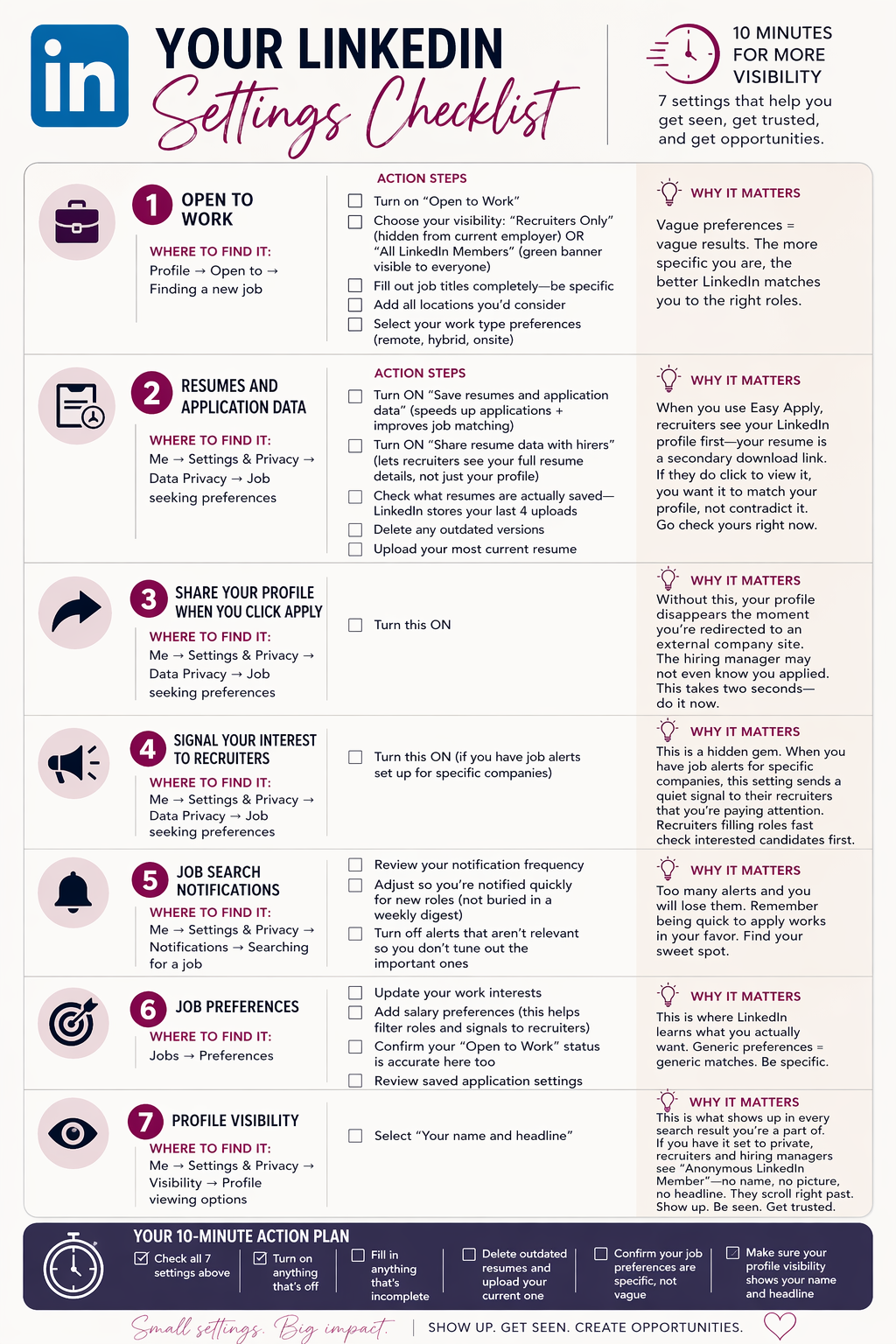
Your LinkedIn Settings Checklist
☐ Setting 1: Open to Work
Where to find it: Profile → Open to → Finding a new job
Action steps:
-
Turn on "Open to Work"
-
Choose your visibility: "Recruiters Only" (hidden from current employer) OR "All LinkedIn Members" (green banner visible to everyone)
-
Fill out job titles completely—be specific, not vague
-
Add all locations you'd consider
-
Select your work type preferences (remote, hybrid, onsite)
Why it matters: Vague preferences = vague results. The more specific you are, the better LinkedIn matches you to the right roles.
☐ Setting 2: Resumes and Application Data
Where to find it: Me → Settings & Privacy → Data Privacy → Job seeking preferences
Action steps:
-
Turn ON "Save resumes and application data" (speeds up applications + improves job matching)
-
Turn ON "Share resume data with hirers" (lets recruiters see your full resume details, not just your profile)
-
CRITICAL: Check what resumes are actually saved—LinkedIn stores your last 4 uploads
-
Delete any outdated versions
-
Upload your most current resume
Why it matters: When you use Easy Apply, recruiters see your LinkedIn profile first—your resume is a secondary download link. But if they do click to view it, you want it to match your profile, not contradict it. This is exactly what caught my client. She had no idea an old resume was attached to every application she submitted. Go check yours right now.
☐ Setting 3: Share Your Profile When You Click Apply
Where to find it: Me → Settings & Privacy → Data Privacy → Job seeking preferences
Action steps:
-
Turn this ON
Why it matters: Without this, your profile disappears the moment you're redirected to an external company site. The hiring manager may not even know you applied. This takes two seconds—do it now.
☐ Setting 4: Signal Your Interest to Recruiters
Where to find it: Me → Settings & Privacy → Data Privacy → Job seeking preferences
Action steps:
-
Turn this ON (if you have job alerts set up for specific companies)
Why it matters: This is a hidden gem. When you have job alerts for specific companies, this setting sends a quiet signal to their recruiters that you're paying attention. Recruiters filling roles fast check interested candidates first. This puts you on that shortlist without ever sending a cold message.
☐ Setting 5: Job Search Notifications
Where to find it: Me → Settings & Privacy → Notifications → Searching for a job
Action steps:
-
Review your notification frequency
-
Adjust so you're notified quickly for new roles (not buried in a weekly digest)
-
Turn off alerts that aren't relevant so you don't tune out the important ones
Why it matters: Too many alerts and you will lose them. Remember being quick to apply works in your favor. Find your sweet spot.
☐ Setting 6: Job Preferences
Where to find it: Jobs → Preferences
Action steps:
-
Update your work interests
-
Add salary preferences (this helps filter roles and signals to recruiters)
-
Confirm your "Open to Work" status is accurate here too
-
Review saved application settings
Why it matters: This is where LinkedIn learns what you actually want. Generic preferences = generic matches. Be specific.
☐ Setting 7: Profile Visibility
Where to find it: Me → Settings & Privacy → Visibility → Profile viewing options
Action steps:
-
Select "Your name and headline"
Why it matters: This is what shows up in every search result you're a part of. If you have it set to private, recruiters and hiring managers see "Anonymous LinkedIn Member"—no name, no picture, no headline. They don't resonate with you. They don't trust you. They scroll right past. You want them to see your name, your face, and that amazing headline showing your value and impact immediately. No name. No picture. No trust.
Your 10-Minute Action Plan
Set a timer. Open LinkedIn. Work through this checklist:
-
☐ Check all 7 settings above
-
☐ Turn on anything that's off
-
☐ Fill in anything that's incomplete
-
☐ Delete outdated resumes and upload your current one
-
☐ Confirm your job preferences are specific, not vague
-
☐ Make sure your profile visibility shows your name and headline
That's it. Ten minutes.
These settings won't replace a strong profile, a clear personal brand, or a smart networking strategy. But they make sure that when you do the bigger work, the platform is actually working with you—not against you.
Because the last thing I want for you is to be like my client who spent weeks perfecting his profile and applying to roles, only to show up as "Anonymous LinkedIn Member" on the other side.
You're not anonymous. Let LinkedIn prove it.
Until next Monday,
💛 Alyssa
P.S. Ready to take this further?
These settings are just the beginning. When your LinkedIn profile and resume actually reflect your value, the traction changes fast.
Here are two ways I can help:
Option 1: Resume + LinkedIn Branding
If you're not looking for full coaching but need your personal brand to actually work for you, this is it.
Option 2: VIP 1:1 Coaching
For those who want the full strategic partnership—from clarity to offer letter. My C.L.E.A.R. Framework takes you through every phase: defining what you want, positioning your brand, expanding your reach, nailing interviews, and negotiating offers you're excited about.
This is for you if you want ongoing support, accountability, and a coach in your corner until you land the right role.
You can learn more on both options here: https://www.riseupcareercoach.com/work-with-me

Responses