Hey there,
If job searching has started to mean scrolling through the same feeds and wondering what you might be missing, let’s give your search a little more structure. You don’t need a complicated system or another paid tool to get started. You need a clear target, a few good search terms, and a way to keep track of what you find.
THIS WEEK’S CAREER TIP
A focused job search starts before you type into the search bar.
When your target is broad—“something in leadership,” “a remote role,” or “a better opportunity”—the results will be broad, too. But when you define the work, level, and conditions you want, you can search more intentionally across job boards and company career sites.
The goal isn’t to find every opening on the internet. It’s to make it easier to find relevant roles, check the employers you care about, and follow through on the strongest opportunities.
The bottom line: A simple search plan can help you spend less time scrolling and more time evaluating roles that fit.
GOOD STUFF THIS WEEK
Before you search, set up one simple spreadsheet. Give it columns for:
-
Company
-
Careers page link
-
Job site or platform (if you can identify it)
-
Target titles or keywords
-
Date checked
-
Relevant roles and next step
Start with 10 companies you’d be interested in. Your list can include employers you know, companies in your industry, or organizations whose work interests you. You don’t have to know whether they’re hiring today; the list gives you a place to return to and a way to track what you learn.
A CLOSER LOOK
Here’s a step-by-step way to build a Boolean search. Boolean search simply uses words like OR to group alternatives and find listings that match your criteria. We’ll use this example: someone looking for a senior customer success role, ideally remote or hybrid.
1. Choose one search lane
Write down the kind of work and level you want to focus on for this search. For example:
-
Work: Customer Success
-
Level: Senior Manager or Director
-
Location: Remote or hybrid
If you’re considering several different career paths, run a separate search for each one. Combining unrelated roles can make the results harder to evaluate.
2. List title variations
Employers may use different titles for similar work. Put those options in parentheses and separate them with OR:
("Director of Customer Success" OR "Senior Manager, Customer Success" OR "Director of Client Success")The quotation marks keep each title together as a phrase. Replace these titles with the ones that make sense for your background and target level.
3. Add the skills or work you want to find
Think about the capabilities that matter in the roles you want. For this example, that might be retention, renewals, or customer adoption:
("retention" OR "renewals" OR "customer adoption")Use terms that describe the work you want to do, not only the wording in your current job title. Start with a few alternatives. If you add too many required terms, you may miss good roles that use different language.
4. Choose where to search
You can paste Boolean searches into the regular Google search bar. To look across some common job-posting platforms, add a group like this:
(site:myworkdayjobs.com OR site:boards.greenhouse.io OR site:jobs.lever.co OR site:jobs.ashbyhq.com)These domains are examples, not a complete list of every company’s job site. You can also look at the web address of a job posting to see which platform it uses, then add that site to a future search.
5. Put the pieces together and copy the search
Here’s the full example. Copy it into Google, then replace the titles, skills, and location terms with your own:
(site:myworkdayjobs.com OR site:boards.greenhouse.io OR site:jobs.lever.co OR site:jobs.ashbyhq.com)
("Director of Customer Success" OR "Senior Manager, Customer Success" OR "Director of Client Success")
("retention" OR "renewals" OR "customer adoption")
("remote" OR "hybrid")
Google may show results that aren’t a fit, or miss roles you’d want to see. If you get very few results, remove one group, such as the skills or location terms, and try again. If you get too many, narrow the titles or add a more specific keyword.
6. Filter for recently published results
After you run your search, look below the search box and click Tools. Open the Any time filter and choose Past 24 hours or Past hour to narrow the results to recent pages. The filters available can vary based on your search and browser.
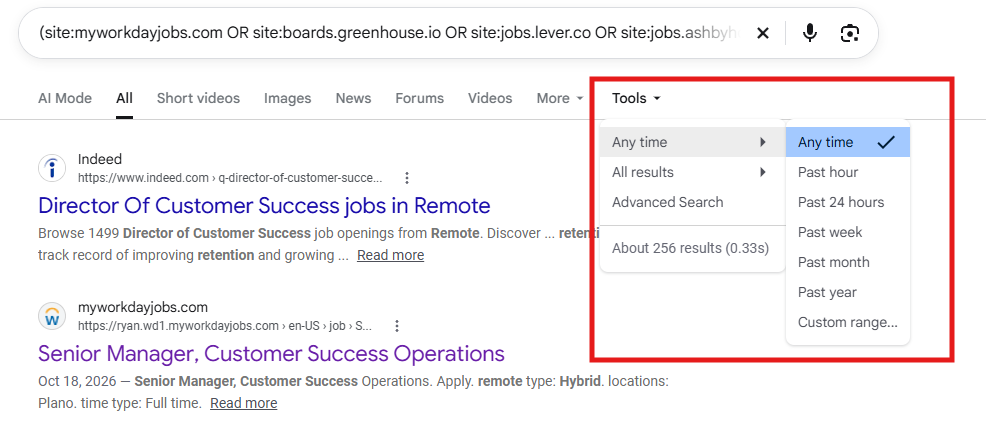
Use this as a way to surface recent results, then check the employer’s posting for the actual date and whether the role is still open. Google’s date information isn’t a substitute for confirming the listing on the company’s site.
7. Use your company list to guide the next search
The broad search can help you discover roles and employers to add to your tracker. For companies already on your list, go directly to the careers page you saved and search its openings. If you know the careers-site domain, you can also try a company-specific Google search by replacing the placeholder below:
site:[company-careers-domain]
("Director of Customer Success" OR "Senior Manager, Customer Success")
For example, replace [company-careers-domain] with the domain you see in that company’s job listings. Keep the careers page link and date checked in your spreadsheet so you know where to return next time.
8. Confirm the posting and record your next step
Search results can include outdated listings, so open the employer’s official careers page and confirm that the role is still active. If it is, add the role and link to your tracker, note the date, and choose your next step, such as tailoring your résumé, reaching out to a contact, or applying.
You don’t need to build the perfect system before you begin. Try one search lane, save the query, and improve it as you learn which titles and keywords bring back useful results.
Before you go: Reply and tell me one role title you’re targeting. I’d love to hear what you’re hoping to find in your next step.
💛 Alyssa Bailey
Thanks for reading Rise & Shine by Rise Up Career Coaching.
This newsletter is for high-performing professionals who feel stuck, overlooked, or unsure of their next move — and want a clearer, smarter way to navigate the modern job market.
Here, I share real talk about:
-
Getting clear on what you actually want next
-
Navigating job searches without mass applying
-
Networking in ways that actually lead to conversations
-
Interviewing with confidence (even if you’re rusty)
-
Negotiating offers without leaving money or opportunity on the table
The job market has changed, but most career advice hasn’t. I’m here to help you stop guessing and start moving forward with clarity and strategy.
I'm here to change that.
Get the newsletter delivered straight to you:
📧 Email: Sign up on my website.
💙 LinkedIn: Subscribe here to get it in your feed
ALYSSA BAILEY is a Certified Professional Career Coach who helps high-performing professionals get unstuck and land roles that match who they are now. With 15+ years of corporate experience, she’s guided clients through career transitions, interviews, and negotiations — helping them turn experience into opportunity.
If you’re done waiting for clarity or the “right time,” this is your sign.
Your next role won’t come from working harder. It comes from having the right strategy.
Let’s make your next move — intentionally.
P.S. If you’ve been thinking about making a change “someday,” remember: clarity doesn’t come from waiting. It comes from action.
Let's make your next move. Contact me today.
To read past Rise & Shine newsletters, you can find them here.





Responses